
When making patches that are of good quality, what stands first in the process is the design. Many people pay a handsome amount to get their designs made from a designer, just because they are not aware of the custom patch design software and embroidery digitizing software for patches that actually exists to design patches without costing a penny. Their lack of this awareness makes them pay heavy amounts just for the designs when they can just design their logos and artwork themselves, however, the way they like with ease.
We are here with this guide to brief you on software that can easily be used for free to make your logo or artwork for patches.
Why Does Software Matters?
Different patches need different design tools. Some need clean shapes, some need stitch files. Good software will make a better design. It also helps avoid mistakes in production and saves time during manufacturing because you will not have to ask and pay for the design service. You can just upload your design, and your patch will go under process without waiting for another minute.
When You Need Digitizing?
Embroidered and chenille patches need free embroidery digitizing software because it tells the machine how to stitch and control stitch direction to help keep letters and edges strong. It improves the outcome of the patch and tells you how your logo or artwork will look before you order custom patches online.
When Vector Art Is Enough
Woven, PVC, leather, and sublimated patches do not need digitizing, they just need clear, simple artwork to keep their edges sharp and clean. This makes the patches easier and faster to prepare without messing up the artwork of your patch. They work best for smooth color designs and will not let the machine interpret anything wrong.
Why File Quality Determines Patch Quality
Clean Lines Create Clean Stitching
- Smooth artwork makes neat borders and nice curves.
• It helps the patch look tidy.
• The design looks clear and sharp.
Low Resolution Loses Detail
- Blurry files make small words and shapes hard to see.
• Tiny parts may disappear.
• The patch may look unclear.
Better Stitch Density
- Clear files help stitches stay even and balanced.
• The patch looks full and smooth.
• It feels better in the hand.
Stronger Underlay Support
- Good artwork helps the base stitches hold the fabric.
• This keeps the patch in shape.
• It helps the patch stay strong.
Better Color Accuracy
- Clean files show where each color should go.
• This helps match thread colors better.
• The patch looks bright and correct.
Faster Production
- Good files need less fixing before work starts.
• This saves time and money.
• You get your patch sooner.
The Top Design Software Tools
Some tools are easy for beginners, and some are designed to be handled by experts but what is very important is choosing the right design software for making good patch files. Following is a simple list of popular software, and what they are best for.
Adobe Illustrator
A professional vector design tool used for creating clean logos, shapes, and artwork for patches.
Best for
- Embroidered, woven, PVC, sublimated, and leather patches
• Clean vector artwork creation
Key features
- Very precise vector editing
• Industry standard for logo design
• Easy export to AI, EPS, PDF, SVG
Limitations
- Not a digitizing tool (needs Wilcom/Hatch for stitching files)
• Learning curve for beginners
CorelDRAW
A vector design software similar to Illustrator, popular in print and patch industries.
Best for
- Woven, PVC, leather, and sublimated patches
Key features
- Strong vector control
• Good for logo cleanup and layout work
• Easy file exporting for manufacturers
Limitations
- Not ideal for embroidery digitizing
• Less common than Illustrator globally
Wilcom EmbroideryStudio
The industry-standard embroidery digitizing software used by professional patch makers.
Best for
- Embroidered and chenille patches
• Complex stitch-based designs
Key features
- Advanced stitch control (density, direction, underlay)
• Auto-digitizing tools
• Production-ready file output (DST, EMB, etc.)
Limitations
- Expensive
• Harder to learn for beginners
Hatch Embroidery (by Wilcom)
A simplified version of Wilcom vs Hatch patches designed for small businesses and beginners.
Best for
- Embroidered patches
• Small business production
Key features
- Easy auto-digitizing
• Built-in design tools and fonts
• Beginner-friendly interface
Limitations
- Some advanced features are locked in higher plans
• Still requires learning stitch basics
Ink/Stitch
Ink/Stitch for custom patches is the best free patch maker software for Inkscape that converts vector art into embroidery stitch files.
Best for
- Hobby embroidery projects
• Simple embroidered patches
Key features
- No cost
• Good for learning digitizing basics
• Works with vector artwork
Limitations
- Steep learning curve
• Slower workflow compared to paid tools
Canva
A beginner-friendly online design tool for simple graphics and layouts.
Best for
- Basic patch ideas and mockups
• Non-technical users
Key features
- Very easy to use
• Drag-and-drop design
• Great for quick concepts
Limitations
- Not a professional vector/digitizing tool
• Needs export cleanup in Illustrator or CorelDRAW
Embird
Embird embroidery software patches is a modular software where you buy only the tools you need.
Best for
- Small embroidery shops
• Custom sports, scout, and simple patch work
Key features
- Flexible add-on system
• Basic editing and file conversion
• Lightweight and affordable
Limitations
- Outdated interface
• Limited automation and modern tools
Figma
A cloud-based design tool used for UI design and simple artwork layouts.
Best for
- Mockups and design approval
• Team collaboration before production
Key features
- Real-time collaboration
• Clean vector-style design tools
• Easy sharing with clients
Limitations
- Not for embroidery or production files
• Needs export to real design software for manufacturing
Embrilliance PatchArtist
PatchArtist Embrilliance review is a patch-focused embroidery tool that automatically builds patch shapes and borders.
Best for
- Quick patch design layouts
• Uniform and sports patches
Key features
- One-click patch border creation
• 150+ built-in shapes
• Simple workflow for patch design
Limitations
- Limited deep digitizing control
• Focused mainly on patch styling, not full design work
AI Auto-Digitizing
AI embroidery digitizing software 2026 that converts artwork into stitch files automatically.
Best for
- Fast sample designs
• Simple embroidery logos
Key features
- Very fast file creation
• Saves time on simple designs
• Helpful for beginners and drafts
Limitations
- Struggles with complex artwork
• Often needs manual fixing for production-ready quality
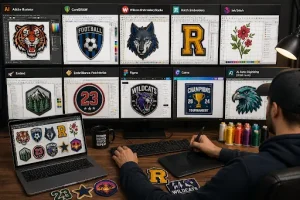
| Software | What It Is | Best For |
| Adobe Illustrator | Professional vector design tool | Embroidered, woven, PVC, leather, sublimated patches |
| CorelDRAW | Vector design software for branding | Woven, PVC, leather, sublimated patches |
| Wilcom EmbroideryStudio | Professional embroidery digitizing software | Embroidered & chenille patches |
| Hatch Embroidery | Simplified Wilcom version | Small business embroidery |
| Ink/Stitch | Free embroidery plugin for Inkscape | Hobby embroidery, simple patches |
| Embird | Modular embroidery software | Small shops, sports/scout patches |
| Embrilliance PatchArtist | Patch-focused embroidery software | Quick patch design & borders |
| Figma | Cloud design tool | Mockups & design approval |
| Canva | Simple drag-and-drop design tool | Basic ideas & mockups |
| AI Auto-Digitizing (2026 tools) | AI-based stitch file generation | Quick embroidery drafts |
File Formats
Everyone often asks what file format for embroidery patches is suitable. The following are the file formats that can be accepted for patches:
DST / PES (for Embroidery)
- Used by embroidery machines
• Tells the machine where to stitch
• Needed for embroidered patches
AI / EPS / SVG / PDF (Vector Files)
- Clean drawing files with sharp lines
• Can be made bigger or smaller without blur
• Used for PVC, leather, and woven patches
PNG (High-Resolution Image)
- A clear picture file with no background
• Keeps colors bright and simple
• Used for sublimated (printed) patches
| Patch Type | Best File Format | Simple Reason |
| Embroidered | DST, PES | Needed for stitching machines |
| PVC / Leather | AI, EPS, SVG, PDF | Clean vector shapes for molding/cutting |
| Sublimated | High-res PNG, PDF | Needed for full-color printing |
| Woven | AI, EPS, SVG, PDF | Sharp vector artwork for weaving |
Software Pricing
Free Tools
- Ink/Stitch (free SewArt embroidery software)
• Canva (free design mockups)
• Good for learning and simple ideas
Budget Tools (Under $200)
- Embird modules
• Basic Ink/Stitch upgrades
• Best for small shops and beginners
• Good for simple patchwork
Mid-Range Tools ($200–$600)
- Embrilliance PatchArtist
• Hatch Digitizer (entry plans)
• Good balance of power and ease
• Great for small businesses
Professional Tools ($1,000+)
- Wilcom EmbroideryStudio
• High-end digitizing software
• Used by experts and factories
• Best for complex embroidery work
| Price Level | Software | Best For | Simple Note |
| Free | Ink/Stitch, Canva | Beginners, mockups | Good for learning and ideas |
| Under $200 | Embird modules | Small shops, basic edits | Budget-friendly option |
| $200–$600 | Embrilliance PatchArtist, Hatch Digitizer (basic plans) | Small businesses | Easy + powerful balance |
| $1,000+ | Wilcom EmbroideryStudio | Professionals, factories | Advanced embroidery digitizing |
The 3-Stage Workflow Every Brand Should Know
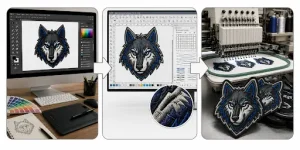
Stage 1 — Design
Create your artwork using tools like Illustrator, CorelDRAW, or Canva. This is where your logo or idea is shaped into a clean visual. Good design here makes everything easier later, and you get the flawless custom patches for thrift store and resale fashion.
Stage 2 — Digitize
Turn your design into a stitch-ready file using Wilcom, Hatch, or Ink/Stitch. This step sets stitch paths, density, and structure for embroidery. It is needed for stitched patch types to work correctly.
Stage 3 — Produce
Send the digitized file to the Patch Maker USA for manufacturing. We turn your design into the final physical patch. At this stage, materials, colors, and finishing are applied which will all be chosen by you.
How We Make It Easier
Patch Makers USA handles Stage 2 (digitizing) and Stage 3 (production) for you. This means you only need to focus on Stage 1, which is preparing your design, but if by any chance you can not prepare your design, we will take the lead in stage one as well on your command.
FAQs
Choose the Right Software for Your Perfect Patch
This blog shows the best software for making patch designs and helps you choose the right tool for your patch type because bad files make bad patches, while good software gives clean and sharp designs.
When you know which software to use for each patch type, what file formats to send, and the easy steps for design and production, creating patches becomes easy. Some tools are for design only, some tools are for digitizing, some may cost a little, but you don’t always need to buy software. Either use the right tool for better patches or let experts like Patch Maker USA handle everything for you.
