From patch trends and design tips to fabric guides and branding ideas, get your hands on real patch talk. Whether you are building merch, planning uniforms, or comparing styles, you will find useful reads that help you make smarter patch decisions without the fluff.
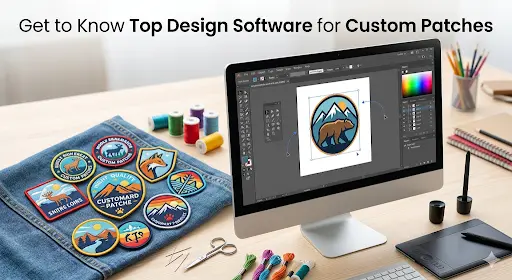
Top Design Software for Custom Patches Creation Revealed
Top Design Software for Custom Patches Creation Revealed
Custom Design Patches
May 1, 2026
Lydia Max
May 1, 2026
06:08 PM
When making patches that are of good quality, what stands first in the process is the design. Many people pay a handsome amount to get their designs made from a designer, just because they are not aware of the custom patch design software and embroidery digitizing software for patches that actually exists to design patches without costing a penny. Their lack of this awareness makes them pay heavy amounts just for the designs when they can just design their logos and artwork themselves, however, the way they like with ease.
We are here with this guide to brief you on software that can easily be used for free to make your logo or artwork for patches.
Why Does Software Matters?
Different patches need different design tools. Some need clean shapes, some need stitch files. Good software will make a better design. It also helps avoid mistakes in production and saves time during manufacturing because you will not have to ask and pay for the design service. You can just upload your design, and your patch will go under process without waiting for another minute.
When You Need Digitizing?
Embroidered and chenille patches need free embroidery digitizing software because it tells the machine how to stitch and control stitch direction to help keep letters and edges strong. It improves the outcome of the patch and tells you how your logo or artwork will look before you order custom patches online.
When Vector Art Is Enough
Woven, PVC, leather, and sublimated patches do not need digitizing, they just need clear, simple artwork to keep their edges sharp and clean. This makes the patches easier and faster to prepare without messing up the artwork of your patch. They work best for smooth color designs and will not let the machine interpret anything wrong.
Get a Quote
Why File Quality Determines Patch Quality
Clean Lines Create Clean Stitching
Smooth artwork makes neat borders and nice curves. • It helps the patch look tidy. • The design looks clear and sharp.
Low Resolution Loses Detail
Blurry files make small words and shapes hard to see. • Tiny parts may disappear. • The patch may look unclear.
Better Stitch Density
Clear files help stitches stay even and balanced. • The patch looks full and smooth. • It feels better in the hand.
Stronger Underlay Support
Good artwork helps the base stitches hold the fabric. • This keeps the patch in shape. • It helps the patch stay strong.
Better Color Accuracy
Clean files show where each color should go. • This helps match thread colors better. • The patch looks bright and correct.
Faster Production
Good files need less fixing before work starts. • This saves time and money. • You get your patch sooner.
The Top Design Software Tools
Some tools are easy for beginners, and some are designed to be handled by experts but what is very important is choosing the right design software for making good patch files. Following is a simple list of popular software, and what they are best for.
Adobe Illustrator
A professional vector design tool used for creating clean logos, shapes, and artwork for patches.
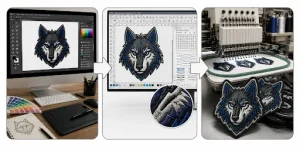
Create your artwork using tools like Illustrator, CorelDRAW, or Canva. This is where your logo or idea is shaped into a clean visual. Good design here makes everything easier later, and you get the flawless custom patches for thrift store and resale fashion.
Stage 2 — Digitize
Turn your design into a stitch-ready file using Wilcom, Hatch, or Ink/Stitch. This step sets stitch paths, density, and structure for embroidery. It is needed for stitched patch types to work correctly.
Stage 3 — Produce
Send the digitized file to the Patch Maker USA for manufacturing. We turn your design into the final physical patch. At this stage, materials, colors, and finishing are applied which will all be chosen by you.
Get a Quote
How We Make It Easier
Patch Makers USA handles Stage 2 (digitizing) and Stage 3 (production) for you. This means you only need to focus on Stage 1, which is preparing your design, but if by any chance you can not prepare your design, we will take the lead in stage one as well on your command.
FAQs
[faq_accordion]
Choose the Right Software for Your Perfect Patch
This blog shows the best software for making patch designs and helps you choose the right tool for your patch type because bad files make bad patches, while good software gives clean and sharp designs.
When you know which software to use for each patch type, what file formats to send, and the easy steps for design and production, creating patches becomes easy. Some tools are for design only, some tools are for digitizing, some may cost a little, but you don’t always need to buy software. Either use the right tool for better patches or let experts like Patch Maker USA handle everything for you.
Get a Quote
Ready to Create Custom Patches That Actually Look Professional?
Don't guess on size, style, or backing. Send us your logo and placement details — we'll recommend the right patch type and get you a proof fast.
Written by
Lydia Max
Lydia Max is a skilled digital marketer at Patch Makers USA, specializing in brand storytelling and strategic outreach. Her expertise lies in showcasing unique patch solutions while pouring engagement through innovative campaigns. She is passionate about helping customers discover the creative possibilities of custom patches customized to their personal and professional needs
 UK
UK CA
CA NZ
NZ